Does iPhone Have a Duress PIN? What iOS Offers Instead of a Duress Passcode
iOS has no duress PIN or duress passcode. What the iPhone offers under pressure (disabling Face ID, Erase Data, Stolen Device Protection) and where a duress code exists.
- As of iOS 26, the iPhone has no duress PIN: one passcode, and no second code that opens a decoy or erases the phone.
- Holding the side button and a volume button disables Face ID until the passcode is entered.
- Erase Data wipes the iPhone after 10 failed attempts, which is slow and visible.
- A duress code exists at the app level: in a photo vault, it is called a Panic PIN.
The short answer
No. An iPhone has one passcode, and that passcode opens everything. iOS has no setting for a second code that would show a different home screen, hide apps, or silently erase data. Apple has never shipped one, and no option under Settings → Face ID & Passcode does this.
A duress code is a second secret that you enter when someone forces you to unlock. The system appears to obey, and does something else: it opens a decoy, sends an alert, or wipes the data. Home alarms and bank systems have used the idea for decades. The article What Is a Panic PIN? covers the concept in detail.
What iOS offers instead
Five iOS features are often presented as a duress PIN. Each one covers a different threat.
1. Disable Face ID with two buttons
Hold the side button and either volume button for about two seconds, until the power-off slider appears. From that moment, Face ID and Touch ID are disabled, and the iPhone asks for the passcode. Apple describes this behavior in its Emergency SOS documentation.
The gesture works with the phone in your pocket. It matters where the law treats a face or a fingerprint differently from a memorized code. It hides nothing once the passcode is entered.
2. Erase Data after 10 failed attempts
Settings → Face ID & Passcode → Erase Data deletes everything on the iPhone after 10 failed passcode attempts, as described in the iPhone user guide.
It is a protection against guessing, not a duress code: there is no single code that triggers it, the delays between attempts add up to more than an hour, and an erased phone is obvious to the person in front of you.
3. Stolen Device Protection
Stolen Device Protection targets a thief who has watched you type your passcode. Away from familiar locations, sensitive actions (viewing saved passwords, turning off Find My) require Face ID or Touch ID with no passcode fallback, and changing the Apple Account password requires a one-hour delay. It protects your accounts. Your photos, messages, and apps remain open to anyone who has the passcode.
4. Lockdown Mode
Lockdown Mode reduces the attack surface against targeted spyware by restricting attachments, web technologies, and wired connections. It has no effect when a person holds the phone and demands the code.
5. Inactivity reboot
Since iOS 18.1, an iPhone that stays locked for about three days restarts by itself, according to a reverse-engineering analysis by security researcher Jiska Classen. After a restart, the encryption keys are no longer in memory until the passcode is entered, which makes forensic extraction harder. It is useful for a seized phone, and irrelevant in a face-to-face situation.
What each feature does under pressure
| Feature | What it does | Hides content from someone who gets the passcode? |
|---|---|---|
| Side button + volume | Disables Face ID and Touch ID | No |
| Erase Data | Wipes the iPhone after 10 failed attempts | No, and the wipe is visible |
| Stolen Device Protection | Protects accounts and passwords | No |
| Lockdown Mode | Blocks spyware vectors | No |
| Inactivity reboot | Purges keys after about 3 days locked | No |
| Hidden album | Locks hidden photos behind Face ID | No, the passcode opens it |
The last row deserves a note: the Hidden album falls back to the device passcode, so the person who has the passcode also has the album. The details are in Can Someone See Your Hidden Photos on iPhone?.
Where duress codes do exist
On Android, GrapheneOS has a duress PIN and password: entering it anywhere the device asks for credentials irreversibly wipes the phone and its eSIMs. The approach is radical, and the result is visible, since the phone is empty afterwards.
On iPhone, a duress code can only exist inside an app, because iOS gives apps no way to change the system passcode's behavior. Photo vaults are where it is most common, under the name Panic PIN or decoy password.
A Panic PIN in a photo vault
In Inner Gallery (our app), the Panic PIN is a second code that opens a secondary space. This space works like the real one: you can add photos to it, browse it, and organize it. The photos behind the main PIN stay encrypted with ChaCha20-Poly1305, and nothing on screen indicates that another space exists.
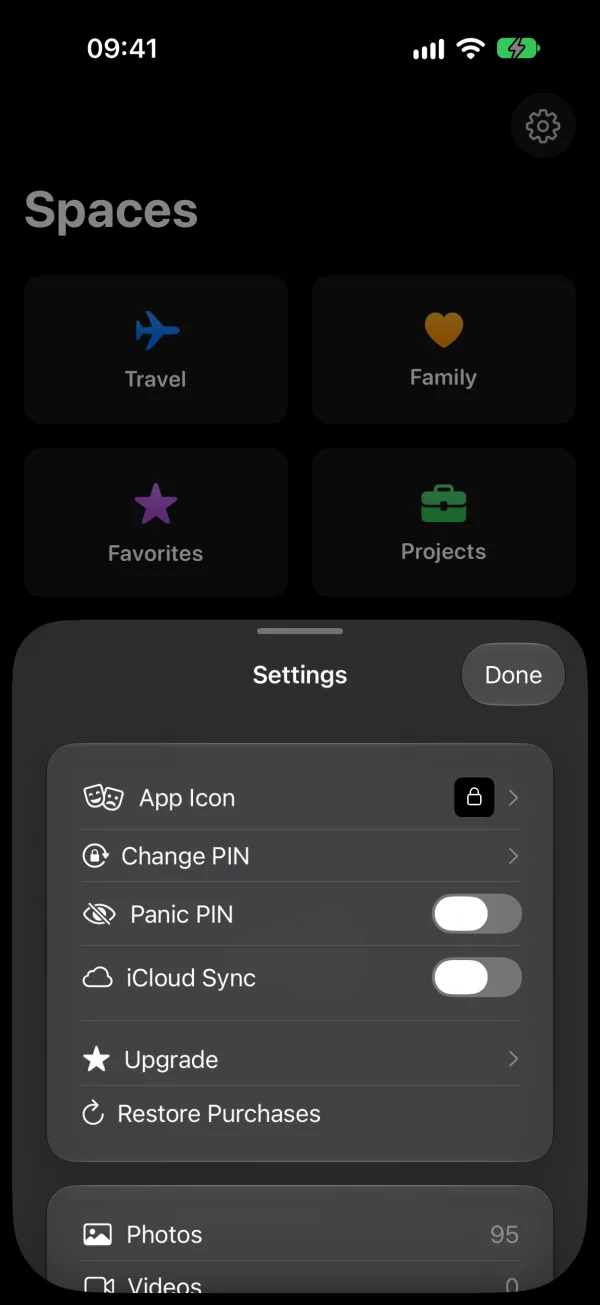
A decoy has limits. It protects what is in the vault, not your messages or your Photos library. It is also a legal matter as much as a technical one: in some countries, refusing to decrypt or misleading an investigator is an offense. The legal section of What Is a Panic PIN? covers France and the United States.
Related reading:
- What Is a Panic PIN?: how duress codes work, the legal context, and three ways apps implement them
- What Happens to Your Photos If You Lose Your iPhone?: what a thief can reach, with and without the passcode
- iPhone Photo Privacy Checklist: the settings to review